Marketplace
Architecture Summary
Dr Migrate supports two distinct Azure Marketplace deployment models, depending on how discovery data is collected:
- Azure Migrate–based Marketplace Deployment
- DMC (Dr Migrate Collector)–based Marketplace Deployment
These models are mutually exclusive. A deployment will use one or the other, not both.
Deployment Models Overview
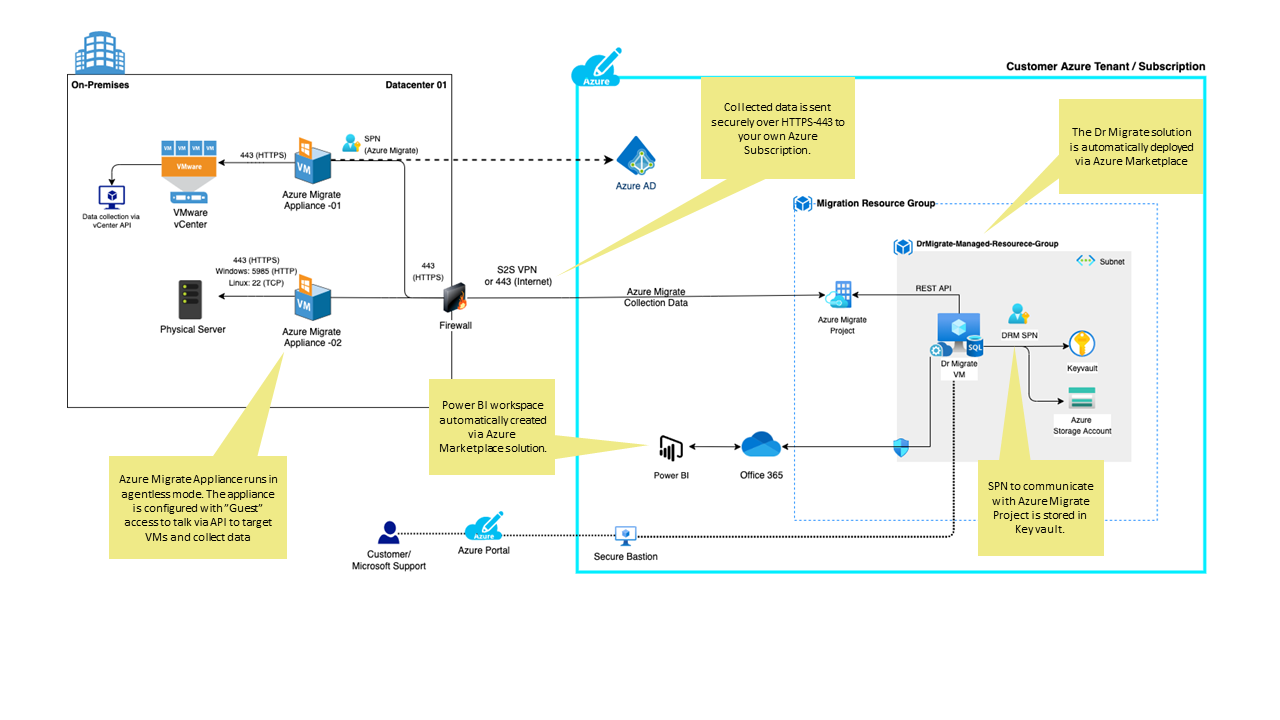
Azure Migrate Marketplace Deployment (Customer-Tenant Hosted)
In this model, Azure Migrate is responsible for all discovery and performance data collection.
Dr Migrate is deployed into the customer’s Azure subscription via the Azure Marketplace and synchronizes with the Azure Migrate Project using a limited-scope Service Principal (SPN).
Characteristics:
- Discovery data remains inside the customer’s Azure tenant
- Azure Migrate appliances perform all on-premises scanning
- Dr Migrate has no direct access to on-prem infrastructure
- Data is accessed via Azure Migrate REST APIs
- Best suited for strict data residency requirements
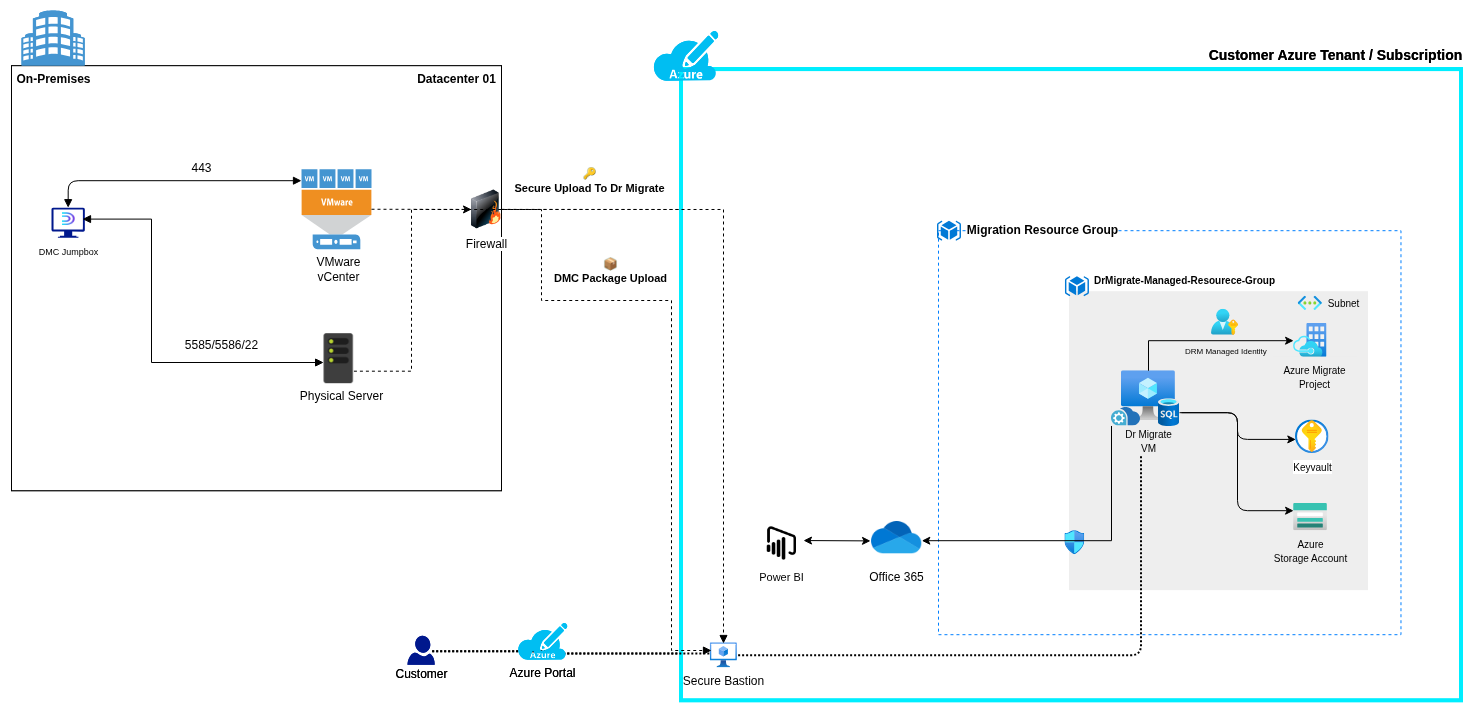
DMC Marketplace Deployment (Hybrid: Customer + Dr Migrate SaaS)
In this model, the Dr Migrate Collector (DMC) is deployed on-premises and connects directly to:
- VMware vCenter
- Hypervisors
- Guest operating systems (Windows / Linux)
- SQL Servers
- Network telemetry (where enabled)
Collected data is packaged locally and securely uploaded outbound to an isolated Dr Migrate SaaS environment.
Characteristics:
- No Azure Migrate appliances
- No Azure Migrate Project required
- Outbound-only connectivity
- No inbound firewall rules
- Supports deeper application, SQL, and network insights
- Ideal for locked-down or Azure-light environments
Key Architecture Differences
| Area | Azure Migrate Model | DMC Model |
|---|---|---|
| On-prem collector | Azure Migrate Appliance | DMC Collector |
| vCenter integration | Yes | Yes |
| Guest-level insights | Limited | Deep |
| Network telemetry | Limited | Full |
| Primary data location | Customer Azure tenant | Dr Migrate isolated SaaS |
| Azure Migrate required | Yes | No |
| Marketplace deployment | Yes | Yes |
| Inbound firewall rules | None | None |
Architecture Diagrams
Identity & Authentication
Azure Migrate Model
- User access via Azure AD
- Dr Migrate uses a customer-owned Service Principal
- Permissions scoped to:
- Azure Migrate Project (read-only)
- Dr Migrate managed resources
DMC Model
- User access via Azure AD B2B
- Uploads use ephemeral, short-lived tokens
- No persistent credentials stored on-premises
- SaaS environment is logically isolated per customer
Dr Migrate Managed Resource Group
For Azure Migrate–based Marketplace deployments, a Managed Resource Group is created automatically in the customer subscription.
| Resource | Purpose |
|---|---|
| Managed Resource Group | RBAC and isolation boundary |
| Dr Migrate VM | Executes analysis and reporting workloads |
| Azure Key Vault | Stores SPN secrets and internal keys |
| Azure Storage Account | Intermediate assessment data (private access only) |
| Service Principal | Reads Azure Migrate Project data |
| Azure Bastion | Secure VM access without public IPs |
| Virtual Network | Network isolation |
| Network Security Groups | VM and Bastion traffic control |
VM Sizing Guidance
| Estate Size | Azure VM SKU | vCPU | Memory |
|---|---|---|---|
| Under 4,000 servers | Standard_B8ms | 8 | 32 GB |
| Over 4,000 servers | Standard_B16ms | 16 | 64 GB |
Data Flow
Azure Migrate Model
Azure Migrate Appliance → Azure Migrate Project → Dr Migrate (Marketplace VM)
- HTTPS only (443)
- Encrypted in transit and at rest
- No direct on-prem access by Dr Migrate
DMC Model
DMC Collector → Encrypted Package → Dr Migrate SaaS (Isolated Environment)
- Outbound-only uploads
- No inbound firewall rules
- Upload timing fully controlled by the customer
Frequently Asked Questions
Does Dr Migrate require access to on-premises servers?
- Azure Migrate model: No
- DMC model: Yes (read-only, outbound only)
Does DMC use Azure Migrate?
No. DMC is a standalone collection framework.
Where is assessment data stored?
- Azure Migrate model: Customer Azure tenant
- DMC model: Isolated Dr Migrate SaaS environment
Is Power BI required?
No. Power BI is optional and increasingly deprecated in favour of native dashboards.
Network Connectivity Requirements
- Outbound HTTPS (443) only
- No inbound firewall rules
- No VPN required
- No persistent credentials stored on-premises
Existing Azure allow-list guidance remains valid.
Choosing the Right Deployment Model
Use Azure Migrate if:
- Data must remain inside the customer tenant
- Infrastructure-level insights are sufficient
- Azure Migrate is already in use
Use DMC if:
- Deep application or SQL insight is required
- Network dependency analysis is needed
- Azure footprint is minimal or non-existent
- Faster assessment turnaround is required